Jan 28

LightField Software to Process your DIY LightField pictures (Part 1)

So you’ve built your own LightField Camera? Taken your first LightField pictures? What’s next?
The next step is finding software that will allow you to process the captured LightField information. There are countless factors in which LightField setups can differ, so unfortunately processing your pictures is not just a matter of click and refocus. There is some software available, though, that will help you work with your very own LightField photographs.

Part one of our feature on “LightField Software” will focus (pun intended) on tools made public by the Stanford Computer Graphics Lab.

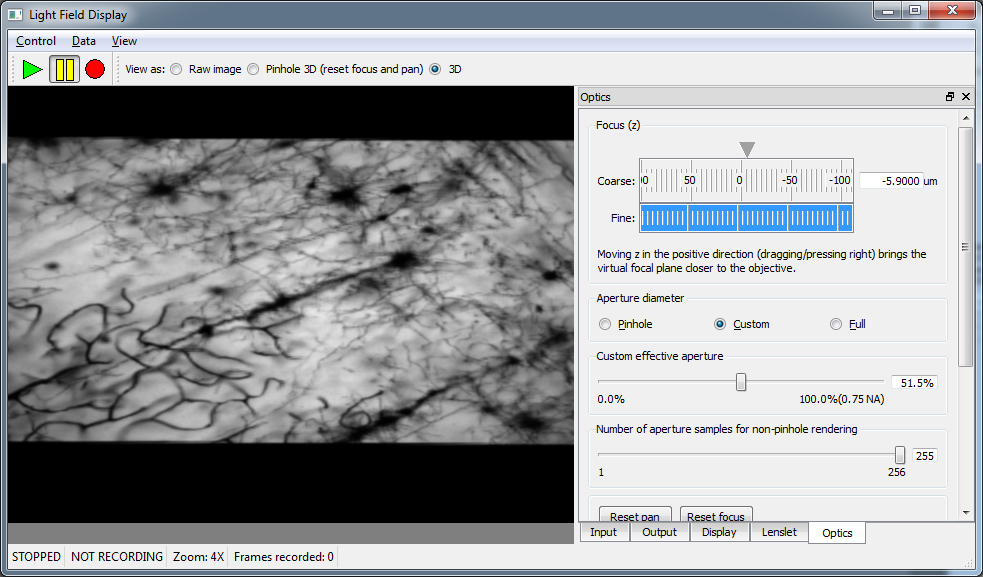
LFDisplay – Real-Time LightField Viewer

LFDisplay - Real-Time LightField Viewer Originally developed for , LFDisplay will also work with LightField pictures taken with other setups (including a DIY LightField camera). The Open-Source tool for Mac and Windows provides the following LightField features

  • software refocus: two refocus sliders (coarse and fine) for adjustment along the virtual z-axis
  • synthetic aperture controls: pinhole, full and custom aperture
  • virtual [tag]3D tilting via click & drag

Continue reading

Aug 28

LFP File Reader: Python Scripts to Read, View and Export Lytro Living Pictures

LFP File Reader is a set of Python scripts by Benham Esfahbod to help you work with LightField pictures outside of Lytro Desktop.

LFP File Reader: Python Scripts to Read, View and Export Lytro Living Pictures

The Python library contains a total of 8 scripts that will allow you to view picture information and export LightField data and processed images (including all in focus images). What’s completely new compared to other solutions, is that LFP File Reader also allows you to have a look into LFP Storage files – a set of embedded data files which are identified by a pathname (i.e. C:\CALIB\WIFI_MAC_ADDR.TXT).

Continue reading

Aug 22

Lytro Library Merger: Easily merge two Lytro Living Picture Libraries

Lytro Library Merger: Easily merge two Lytro Living Picture Libraries Did you have to move your Lytro installation from one PC to another recently? Or from a Mac to a PC? Are you now stuck with two separate Lytro Living Picture Libraries?
Are you looking for a way to move all your Living Pictures into a single, usable Lytro Library?

Say Hello to Behnam Esfahbod’s Lytro Library Merger: It’s an open-source Python script that merges all the photos of a Lytro library to your main Lytro library. Continue reading

Aug 20

Lytro Desktop Dummy: Try the Lytro Desktop Software yourself with 4 LightField Sample Files

Don’t own a Lytro camera yet? Would you still like to check out Lytro’s Desktop Software and refocus feature? With the sample file and information supplied in this article, you can!

Lytro Desktop Dummy: Try the Lytro Desktop Software yourself with 4 LightField Sample Files

How to use:

Jul 24

How to transfer your Lytro LightField Pictures from the Mac to the Windows Desktop Software

Now that Lytro has released the 64 bit Windows version of its Desktop Software, you’ll probably wonder if it’s possible to import any pictures that you have, meanwhile, offloaded to a Mac, back to your PC. The answer is simple: Yes!
Here’s the procedure that worked for us.

How to transfer your LightField Pictures from the Mac to the Windows Desktop Software

Warning: Please back up everything first, and note that we cannot take responsibility if anything goes wrong.

Continue reading